
Production Postgres on Railway: From First Deploy to High Availability
Railway lets you deploy your application and Postgres together in one project. As you grow, you can add recovery, connection pooling, and automatic failover to meet your application's traffic and uptime needs.
This guide follows a small orders API from its first database connection to recovering deleted orders and adding high availability (HA). The companion repository includes the application, migrations, recovery fixtures, and a request probe you can use during a switchover. You'll use disposable data for the exercises, so you can try recovery and failover safely.
Deploy Postgres and connect your application
To get started, deploy the example to get an orders API and a standalone Postgres 18 database connected over private networking. The template gives you a starting point; you'll add backups, point-in-time recovery (PITR), pooling, and HA as you work through the guide.
Deploy the Production Postgres Orders template:

The application service receives this reference variable:
DATABASE_URL=${{postgres.DATABASE_URL}}A reference keeps credentials out of application code and lets Railway update project references when you add pooling or convert to HA. The database doesn't need a public address for application traffic.
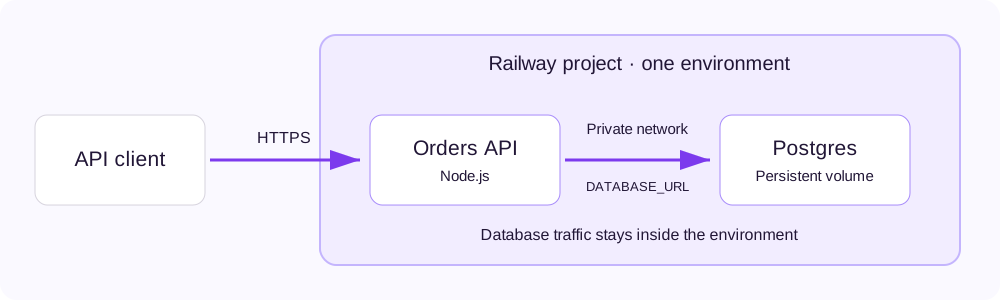
The template also generates an API_TOKEN for the example's authenticated endpoints. Retrieve your token privately from the orders service's Variables tab. Set APP_URL to the orders service's HTTPS domain, then create an order:
curl "$APP_URL/orders" \
  -H "Authorization: Bearer $API_TOKEN" \
  -H 'Content-Type: application/json' \
  -H 'Idempotency-Key: first-order' \
  --data '{"amountCents":2500}'
Amounts use integer cents. Retrying this request with the same key and amount returns the same order, because the database enforces a unique idempotency key. This matters during a connection failure: the server might commit an order even if the client never receives the response. A retry with a fresh key could create a second order.
The repository's Infrastructure as Code file declares the application, official database image, private connection reference, health check, and pre-deploy migration. If you deploy from your own fork, update the GitHub source in .railway/railway.ts, then review railway config plan before applying it. Keep a separate staging environment for schema changes and recovery exercises.
Connect from your laptop
You can use a local tunnel to inspect the database without adding public database access. In a directory linked to the example project:
railway connect postgres --tunnel-onlyThe connect command prints local connection details and keeps the tunnel open. Treat that output as a credential. Leave the terminal running while your database client connects through it.
It's worth pinning your database to a specific Postgres major version. The example uses the official postgres-ssl:18 image so it can follow Railway's HA conversion workflow. To change major versions, use the major upgrade workflow, rather than changing the image tag on an existing data volume.
Give yourself three ways to recover your data
Railway provides volume backups for snapshots and PITR for a chosen timestamp between snapshots. You can also add portable database exports when you need an independently stored copy or a migration path.
| Recovery method | What you recover | Recovery history and scope |
|---|---|---|
| Scheduled volume backups | Database storage at a snapshot time | Daily copies last 6 days, weekly copies 1 month, and monthly copies 3 months. Restore within the original project and environment. |
| Point-in-time recovery | Database state at a selected timestamp in the archive window | The last four weekly full backups provide roughly 4 weeks of history, once backups and WAL archiving are healthy. Restore into a separate service. |
pg_dump exports | A portable logical database copy | You choose the schedule, destination, retention, and compatible restore target. |
A Pro workspace is required to enable PITR and create manual or scheduled volume backups. Enable scheduled volume backups in the database's Backups tab. These backups belong to the volume: wiping the volume also deletes its backups. Keep independently stored exports if your recovery requirements include losing the original project or volume.
Enable PITR before launch, then wait for the first base backup and healthy archiving. PostgreSQL records database changes in its write-ahead log (WAL). Railway archives those changes and base backups to a storage bucket so it can reconstruct an earlier database state. PITR can't recover changes from before you enabled it.
You can inspect coverage with the CLI:
railway postgres pitr status --service postgresThe full backup and restore guide covers scheduling, exports, and offsite storage. Account for storage and network usage in your resource budget.
See recovery work: bring back deleted orders
A recovery exercise lets you check that the data you need is present and your application can use it. PITR creates a separate restored database, so you can validate it while leaving the source in place.
Create a known recovery target
Enable PITR on the disposable example database and wait for its first healthy base backup. Open a shell in the orders service using railway ssh --service orders, then seed three demo orders:
npm run drill -- seed rehearsal-1The command verifies three exact fixture keys and a total of 3,000 cents, then prints a timestamp from the database. Save that output. Wait until the timestamp is covered by the archive before deleting the fixtures:
ALLOW_DEMO_DELETE=yes npm run drill -- delete rehearsal-1The delete command only targets the three fixture keys for rehearsal-1. It doesn't truncate the orders table. Run the exercise in a disposable environment regardless.
Restore and validate the orders
In the source database's Backups tab, select the recorded timestamp and click Restore to this moment. Alternatively, replace the example timestamp below with the exact value from your seed output:
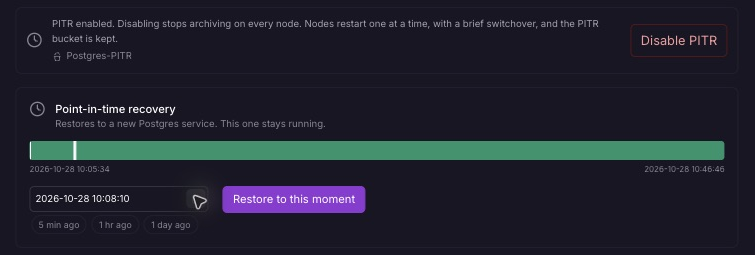
Choose a restore target within the available archive window. This screenshot shows local time (America/Chicago).
railway postgres pitr restore --service postgres \
  --at '2026-10-28T15:00:00.000Z' \
  --new-service-name orders-restored --yes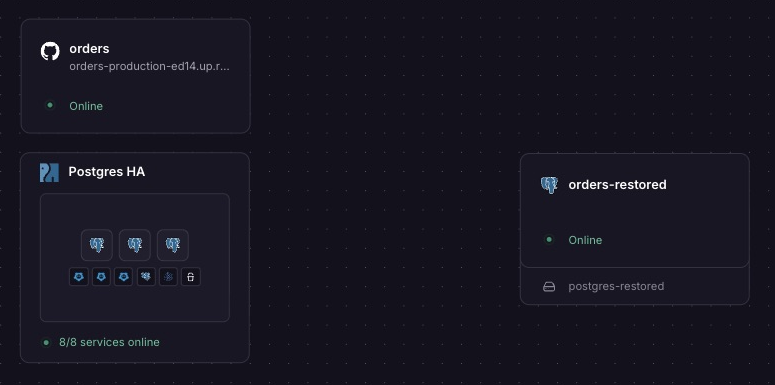
The restored database stays separate from the source. This project also shows the HA setup added later in the guide.
Wait for the restored service to become healthy. Connect a disposable copy of the application to it using a reference to the restored service's DATABASE_URL. In that application copy, run:
npm run drill -- verify rehearsal-1Verification must find the three exact keys and their original amounts. Then create and read an order through the disposable app's authenticated endpoints. Row counts alone don't establish that the application has recovered.
Before switching a live application to a recovered database, account for writes made after the chosen timestamp. Pause writes for the final reconciliation and connection switch. Keep the original database until the recovered copy passes validation. A PITR restore starts without archiving; enable PITR separately if that copy becomes your active database.
Measure your recovery objectives
In the companion exercise on October 28, 2026, PITR restored three deleted orders totaling 3,000 cents into a separate Postgres 18 service. Validation from the application container found the exact original fixture keys and amounts. This small fixture shows that the workflow works. You'll need to test with your own data to measure recovery performance at production scale.
Record the newest recoverable timestamp and the full time needed to restore, validate, reconcile, and reconnect the application. These support two operational targets:
- Recovery point objective (RPO): how much recent data you can afford to lose.
- Recovery time objective (RTO): how long the application can remain unavailable.
A team might target an RPO of 5 minutes and an RTO of 30 minutes. These are example targets, not Railway guarantees. If a restore provisions quickly but takes an hour to validate, it still doesn't meet a 30-minute recovery target.
Verify a portable export too
You can use pg_dump to create a portable backup, then restore it into a separate empty database. Use a client version at least as new as the source server's major version. With DATABASE_URL set privately to the tunnel's connection URL:
pg_dump "$DATABASE_URL" \
  --format=custom --no-owner --file=orders.dump

pg_restore --dbname="$RESTORE_DATABASE_URL" \
  --no-owner --no-acl --exit-on-error orders.dump

DATABASE_URL="$RESTORE_DATABASE_URL" \
  npm run drill -- verify rehearsal-1
Take the dump before deleting the fixtures. RESTORE_DATABASE_URL must point to a scratch database. When pooling is enabled, use an unpooled source connection for the dump. Encrypt exports stored outside the database and define who can access them and when they expire.
Keep database connections under control as traffic grows
Adding application instances also adds database connections. Ten instances with a pool of 20 connections each can request 200 database connections before background jobs and administration are counted.
Railway's connection pooling feature adds PgBouncer in front of standalone Postgres or an HA cluster. PgBouncer lets many application connections share fewer database connections.
-
Open Database → Config → Connection Pooling.
-
Click Add PgBouncer.
3. Select transaction mode for ordinary web requests.
4. Deploy the staged changes.
Railway rewrites references within your project to use the pooler. Update connection strings held outside Railway separately. Add a DATABASE_UNPOOLED_URL reference on the orders service for migrations and tasks that need a dedicated database session.
The runtime pool in the companion application stays small:
const pool = new pg.Pool({
  connectionString: process.env.DATABASE_URL,
  max: 5,
  connectionTimeoutMillis: 5000,
  idleTimeoutMillis: 30000,
  query_timeout: 10000,
});
Five is the example's per-instance limit, not a universal sizing recommendation. Size all application and PgBouncer instances together, leaving database connection headroom for migrations and administration.
Transaction pooling releases a server connection after each transaction. Session settings, LISTEN, session-level advisory locks, and SQL PREPARE need a different connection strategy. You can use session pooling or route those operations through the unpooled URL. The example uses parameterized queries without named prepared statements. Check your driver's prepared-statement behavior before adopting transaction pooling.
The example's migrations use the unpooled URL when it's available:
const pool = createPool(
  process.env.DATABASE_UNPOOLED_URL || process.env.DATABASE_URL,
);
The fallback supports the initial standalone deployment. After pooling is enabled, configure the explicit unpooled reference so migrations bypass PgBouncer. See the PgBouncer guide for framework-specific setup.
After adding database features in the dashboard, import and review the resulting state with railway config pull before applying Infrastructure as Code again. The starter file describes the initial two-service setup. It doesn't manage the lifecycle of an expanded HA cluster.
Add automatic failover when your application needs it
If your application can't wait for a single database to restart or restore, you can add HA. Railway can convert your existing database into a cluster that elects a new primary and routes new connections to it automatically.
The cluster combines three components:
- Postgres data nodes, supervised by Patroni, hold the primary and streaming replicas.
- etcd coordinates leader election.
- HAProxy provides the application's connection entry point and routes traffic to the primary.
The HA conversion workflow supports official Railway Postgres images pinned to major versions 14 through 18. Custom PostGIS and TimescaleDB images are outside that workflow. Keep the database image's default start command.
Open Database → Config → High Availability, choose the cluster size, and review the additional resources before converting. The tested setup uses a primary, two streaming replicas, three etcd coordinators, HAProxy, and PgBouncer. Existing pooling is retained when the database is converted to HA. These services and their storage add to your usage. Existing connections can drop during conversion or failover, so the application must reconnect and handle retries safely.
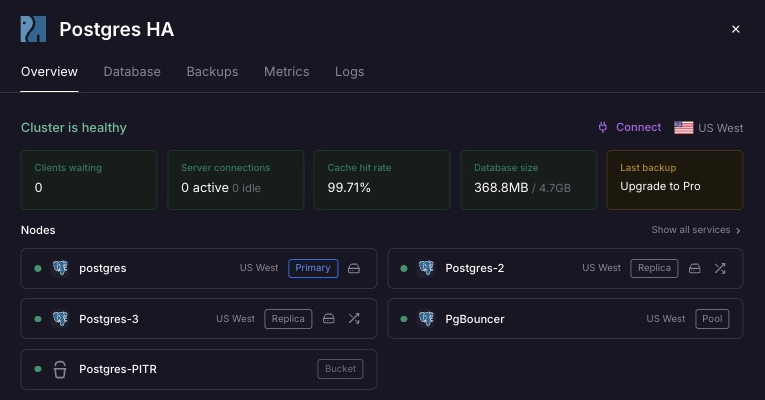
The HA overview identifies the primary and replicas and shows the cluster’s health.
Test a planned switchover
Run the companion probe against the disposable app:
APP_URL="$APP_URL" API_TOKEN="$API_TOKEN" \
  PROBE_SECONDS=120 npm run probe
In another terminal, inspect the cluster:
railway postgres ha status --service postgresChoose an actual replica from that output and request a planned switchover:
railway postgres ha switchover --service postgres \
  --to REPLICA_NAME --yes
The probe attempts an authenticated order write every second with a 5-second request timeout. After a failure, it reuses the same idempotency key. Record the failed attempts, the last successful request before the switch, and the first successful request afterward. Verify those writes against the database.
In one 60-second rehearsal on October 28, 2026, the probe recorded 51 attempts: 41 succeeded and 10 failed during the switch. The start times of the last successful attempt before the interruption and the first successful attempt afterward were 16.959 seconds apart. The original node was then verified as primary. This is one small-workload observation with the sampling interval and timeout above, not a promised failover duration.
A planned switchover tests reconnection during a deliberate role change. It doesn't tell you how long automatic failover will take during an unplanned outage, demonstrate cross-region resilience, or measure throughput. Keep backups and PITR enabled: replicas also copy accidental deletions.
Keep the database healthy after launch
Watch the signals that affect application behavior: slow queries, blocked transactions, connection saturation, storage usage, replication lag, and backup freshness. Give each alert an owner and an action. Metrics, database queries, and the cluster overview help you investigate. Configure ongoing monitoring separately from the application's deployment health check.
Repeat recovery exercises after meaningful changes to data size, schema, and dependencies. Before a major upgrade, test required extensions and application behavior against a restored copy, take a fresh backup, and use the major upgrade workflow. Plan how to reconcile writes if you need to recover afterward.
Railway provides database image security patches, cluster provisioning, and automatic failover for the supported HA setup. Your team owns application schemas, query performance, data, and alerts. Railway doesn't publish an uptime SLA for this offering. The management and support scope explains the responsibilities to consider when choosing your setup.
Build your production Postgres setup on Railway
You can start with the companion template and enable recovery before customers depend on the database. As connection demand grows, add pooling. When your uptime requirements call for automatic failover, you can add HA too.
Before launch, verify private connections, a separate test environment, a pinned Postgres version, healthy backups, and a successful restore. As usage grows, adjust capacity using your workload measurements and keep alert ownership clear. The same Railway project gives you a path from the first database connection to a tested recovery and failover setup.
Frequently asked questions
The answers below distinguish availability, recovery, and the responsibilities your application retains.
Is Railway Postgres suitable for production?
Yes. Railway provides private networking, scheduled backups, PITR, connection pooling, and an HA conversion path. Choose and test the combination that meets your application's recovery and uptime requirements.
Is Railway Postgres fully managed?
Railway's HA offering provisions the cluster, ships image security patches, and provides automatic failover. Your team owns schema design, query performance, data, and alerting. A standalone database has a different management scope. See what Railway manages.
Does Railway Postgres support point-in-time recovery?
Yes, for standalone Postgres and HA clusters. Once PITR has a healthy base backup and archived WAL, Railway can restore a selected timestamp into a separate database without modifying the source.
How far back can I restore with PITR?
The last four weekly full backups provide roughly 4 weeks of history. Your available window starts with the first base backup after enablement and depends on healthy backup and WAL archiving. Check the actual coverage before choosing a target.
Can I recover an accidentally deleted table?
Yes, if suitable recovery history exists. Restore the database to before the deletion, validate the table, then copy the required data back or switch the application after reconciling later writes. PITR restores database state rather than selectively undoing a table operation.
How long does Railway keep scheduled volume backups?
Daily backups last 6 days, weekly backups 1 month, and monthly backups 3 months. Wiping the volume deletes its backups. See volume backup retention.
Can I restore a Railway database on another provider?
Yes. Use pg_dump and restore to a compatible Postgres installation, checking version and extension requirements. Railway volume backups restore within their original project and environment.
Does Railway Postgres support automatic failover?
Yes, after HA conversion. Patroni promotes a replica and HAProxy routes new connections to the primary. Your application must reconnect when existing connections drop.
Do I need HA from the first deployment?
You can add HA when the cost of downtime warrants the additional cluster resources. A standalone database with tested recovery is a starting point for applications that can tolerate restart or restore time. You can convert it as uptime requirements grow.
Does HA replace backups or PITR?
No. HA handles primary failure. Backups and PITR recover earlier data states after mistakes such as destructive migrations, which can also propagate to replicas.
Does Railway include PgBouncer?
Railway offers an optional built-in pooling feature for standalone Postgres and HA clusters. A fresh standalone Postgres deployment accepts direct connections until you add the pooler.
Which connection URL should my application and migrations use?
After enabling pooling, use DATABASE_URL for normal queries and DATABASE_UNPOOLED_URL for migrations and dedicated-session operations. On HA, the unpooled connection still goes through HAProxy to reach the primary.
Can I administer Postgres without exposing it publicly?
Yes. Applications use private networking, and railway connect postgres --tunnel-only provides a local SSH tunnel for administration. You don't need a permanent public database endpoint.
Does Railway publish a Postgres uptime SLA?
Railway doesn't publish an uptime SLA for this offering. Set application recovery targets and validate them with restore and failover exercises. See the HA management scope.