
From registrar to deployed: buying a domain inside Railway
Railway’s primary objective is to reduce friction. Friction all the way from development through to deploying and sharing your project with the world. Part of that is finding a snazzy domain name. The problem though, is that this process has always been completely outside of Railway and when you finally do find a good domain, bringing it into Railway is a tedious process.
Not anymore. You can now buy domains on Railway. Search for a name, see the price, click purchase and everything is configured for you.
railway.com/domainsTo understand what we built, it helps to know what the process looked like before.
Using custom domains in Railway
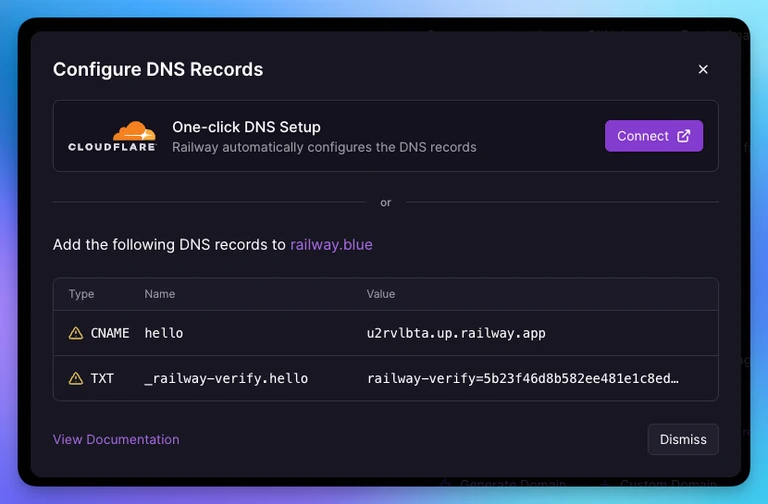
To bring a custom domain into Railway you need to add two DNS records at your registrar.
First, a TXT verification record that proves you own the domain (the value being an HMAC-SHA256 of the workspace ID and some secret). Second, a CNAME record that points the domain to Railway. With these we can generate a certificate and serve your app's traffic.
That means copying 4 values between tabs, pasting them into the right fields at your registrar, and then waiting. DNS is notoriously slow, so you sometimes don't know if you did something wrong or if records are still propagating. It's frustrating.
We wanted to turn that into a single click.
Adding DNS records in 1-click
If your domain is managed by Cloudflare, the entire process of adding DNS records is now a single click. Add your domain in Railway, authorize Cloudflare, and Railway configures your DNS records automatically.
One-click DNS configuration for Cloudflare-managed domainsHow we built it
We became a Domain Connect service provider. Domain Connect is an open standard that allows platforms like Railway to automatically add DNS records for DNS providers like Cloudflare and GoDaddy. It is only supported by a handful of providers, but it is notably supported by Cloudflare, which is used by a large portion of users on Railway.
To add support we first had to PR a template into the Domain-Connect/Template repo on GitHub. This template includes some basic info about Railway and most importantly, which DNS records we want to add.
{
    // more fields above
    "syncPubKeyDomain": "domainconnect.railway.com",
    "syncRedirectDomain": "railway.com",
    "hostRequired": true,
    "records": [
        {
            "type": "CNAME",
            "groupId": "cname",
            "host": "@",
            "pointsTo": "%target%",
            "ttl": "3600"
        },
        {
            "type": "TXT",
            "groupId": "verification",
            "host": "%verifyHost%",
            "ttl": "3600",
            "data": "railway-verify=%verification%",
            "txtConflictMatchingMode": "Prefix",
            "txtConflictMatchingPrefix": "railway-verify="
        }
    ]
}
The syncPubKeyDomain tells DNS providers (e.g. Cloudflare) where to find the public key that we sign requests with. This prevents anyone from impersonating Railway since we are the only ones with the private key. You can find this yourself by running the following command
dig TXT _dcpubkeyv1.domainconnect.railway.com
When you add a custom domain to Railway we check if it supports the DomainConnect protocol (using a Go library that we open sourced) by looking for a TXT record at _domainconnect.{domain}.
$ dig +short TXT _domainconnect.railway.blue
> "api.cloudflare.com/client/v4/dns/domainconnect"
If we see something like this then we can show a fancy button that will redirect you to Cloudflare so that you can authorize the DNS records being added to your account. So much easier than copy and pasting!

This is great if you already have a domain. But finding a domain in the first place is already a tedious process. It is another account you have to manage and make sure has your billing details. We wanted to remove all that friction and just let you search and purchase domains directly from Railway.
Railway domains
When you go to railway.com/domains, you can search for a domain, see the price, and buy it in a couple of clicks. The domain is registered, DNS is configured, and a certificate is provisioned. No tab switching, no copy-pasting records, no waiting around wondering if you did something wrong.
To make the search experience even better, if you type a phrase like "pet store in montreal" instead of a domain name, the domain search field switches to “suggestion” mode and returns relevant domains that are available. Useful when you need to spark some creativity. Under the hood we use Claude Haiku and stream brandable domain suggestions from your description. Each suggestion feeds through the existing search pipeline, and results merge into the same grid.

But what if going to railway.com/domains is still too much friction? How can we smooth it out even further? By bringing domain search directly into your service settings. You can search and buy a domain without ever leaving the context of what you're working on.
You can also attach your owned Railway domains inline. For example if you type api. , the custom domain combobox suggests api.yourdomain.com automatically.

While the entire search experience seems simple on the surface, a lot of work went into making the search fast and scalable.
How we built Railway Domains
Domain search has a latency problem: users want to search at the speed of thought, but looking up whether a domain is available requires hitting registrar APIs that have rate limits and don't appreciate being spammed with hundreds of requests per second.
To get around this, we split the search in two. Initial queries go to the Fastly domain research API. This has high rate limits and lets us query at the speed someone types. Results populate with availability and pricing for the TLDs we support (over 250), no restricted or claims-based TLDs.
This on its own was not enough to get the experience we wanted, so we implemented various levels of caching through the search.

Domain search and availability are cached in Redis on the backend using a stale-while-revalidate approach. Since availability doesn't change that often, we serve the stale data and refetch in the background as opposed to making you wait.
On top of that we use a websocket-based API instead of the GraphQL API we use throughout the rest of the dashboard. This allows much faster communication with our search backend.
Search for domains at the speed of thoughtOnce you click purchase, we charge your existing payment method, register the domain with WHOIS privacy enabled and auto-renewal on.
If you’re purchasing in the context of a service, we auto-attach the domain and configure the DNS records using the same callback infrastructure as Domain Connect. Certificate provisioning happens through the normal cert workflow.
If you’re purchasing without a specific service in mind, the domain lands in your workspace’s domain inventory. The page shows all your purchased domains: name, expiration, which service it’s connected to, auto-renew toggle. We don’t show any DNS setup instructions for Railway-managed domains since there’s nothing to set up.
Where we are today
These pieces together cover the full range of where a user might start. You own a domain at a supported registrar and Domain Connect handles it in one click. You want a new domain without dealing with an external registrar, so you search and buy it directly from Railway. Either way, you go from zero to serving traffic on a custom domain without leaving the platform.
There are a few things we intentionally left out of the first release.
- Domain transfers between workspaces. The data model supports it, but the UI doesn't expose it yet. Our support team can handle these today.
- Transferring domains out of Railway. Not self-serve yet, though we can do it manually for enterprise accounts.
- Manual DNS record management. You can't add arbitrary DNS records to Railway-owned domains. This is deliberate. We want to own that complexity so you don't have to think about it.
Search for your next domain at railway.com/domains. If you run into anything or have feedback, let us know on Central Station.

