
State of Railway: Agents
Moving forward, it's a safe bet to say that agents are going to be responsible for building and operating a large portion of software being developed. Because of this, we believe that Railway needs to feel like the the most friction free place for agents to go end-to-end in software development. In this case, end-to-end means crafting an Agent Experience that goes from the first 5 minutes you've signed up, through the first deployment, debugging your first failure, and shipping v2 of your application - all cleanly. It's a wide charter!
For agents, building the best version of this loop is where we are driving a lot of our optimizations around. We have to make the experience of going from "bright idea" to "elegant solution", effortless, without requiring you to login and click around a dashboard.
So, let's talk State of Railway: Agents.
All aboard, agents. Sign-Up through first deployment.
Tends of thousands of users every week manage Railway exclusively through agent actions, with a significant percentage of those being brand new users. When we look at the earliest signs of delightful experiences with Railway - it always starts with "Can we go from zero to deployed in one action". Thats a great start, but we needs to take it further. A great Agent Experience means the agent comes away with the context on how it can best operate.
We've reworked how our core web properties respond to agents, and the markdown we serve to agents is tuned specifically for harnesses, to guide them through that initial agent configuration. This goes beyond the standard llms.txt approach - we look at a set of heuristics around inbound connection; and if it matches - we serve up that agent context.
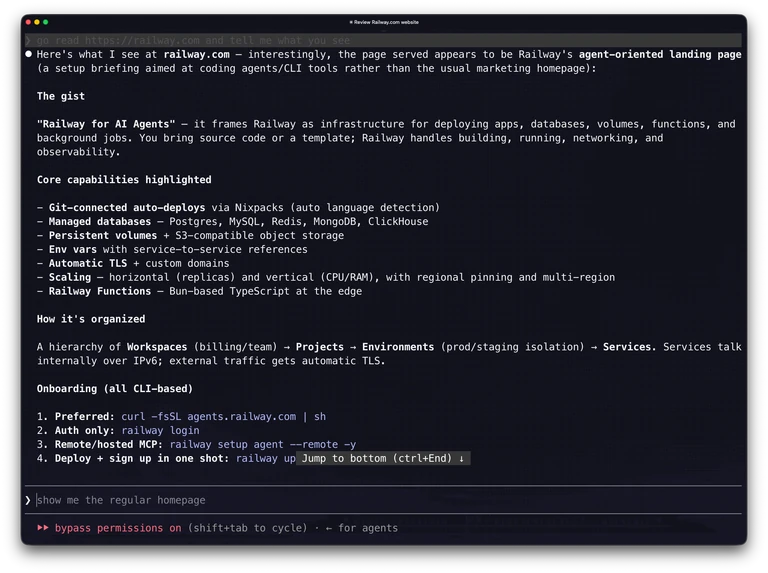
These instructions guide the agent on the installation flow for our agent tooling, and how the agent should start using it.
Home for the Agents
We launched https://agents.railway.com, giving /agents a big facelift. It now functions as the entry point for how agents get pulled into setting themselves up for Railway the right way. The goal is to ensure that an agent can find Railway, understand the install path, configure the right tools, and get to the first deploy without needing the user to translate product concepts and dashboard clicks along the way. Short-circuit onboarding.
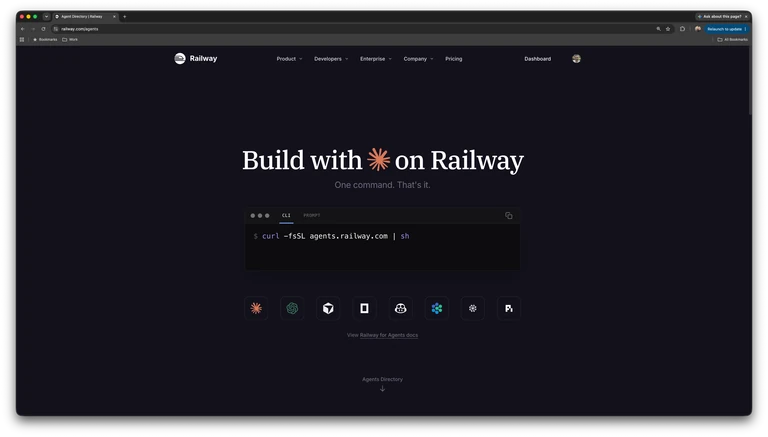
Shortening zero-to-one is still the most important thing. Agents are very good at continuing once they have a working loop. The hard part is getting that loop started without dropping context. We need good docs and content to establish what the right context is, better tools for obtaining that context and taking action, and workflows that will properly guide the agent on the actions it should take.
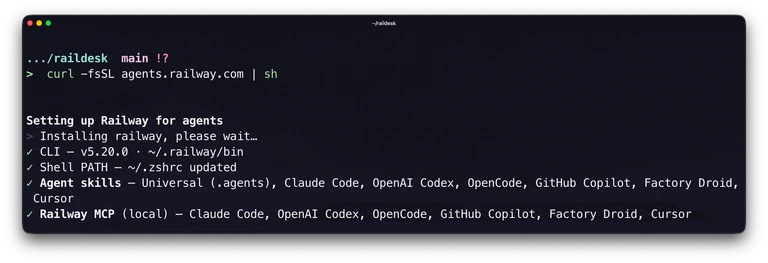
Continuing down that path, we've rebuilt the installation flow and the wizard experience for the Railway CLI and agent configurations, to optimize getting the agent flow setup correctly, and keeping it updated and healthy. The installer (curl -fsSL agents.railway.com | sh) configures your agent, the Railway Agent skills, and MCP servers in one-shot end-to-end.
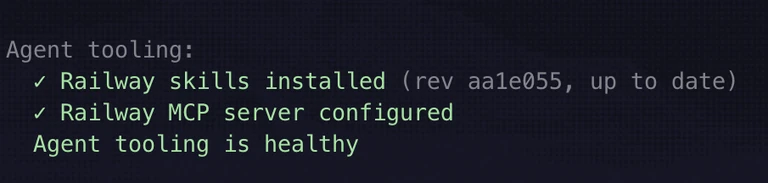
We also added health checks to help ensure that the configuration stays in good shape.
The CLI as an agent interface
In Railway; the CLI acts as the first tool in the box for agents. The work we've done here shows up in boring-but-important places: wider sets of tools for interaction paths (last week we added network interactions, this week we're tackling domain configurations), better JSON output, more flexibility around project / environment / service scoping, dropping interactivity requirements across many of the tools, clearer status and log commands, and more information around deployment state - successes AND failures.
Every new feature we drop needs a first class CLI primitive that can be consumed. The work we've done on sandboxes is a great example here.
We've also added agent configuration health checks into the CLI. If your Railway skills are missing, outdated, or not configured for the harness you are using, the CLI surfaces it, and our agent skills tell the agent how to fix it. These Skills can be updated through the railway skills command as we keep improving the instructions, and if you're on the newer CLI versions, skill updates should happen automatically.
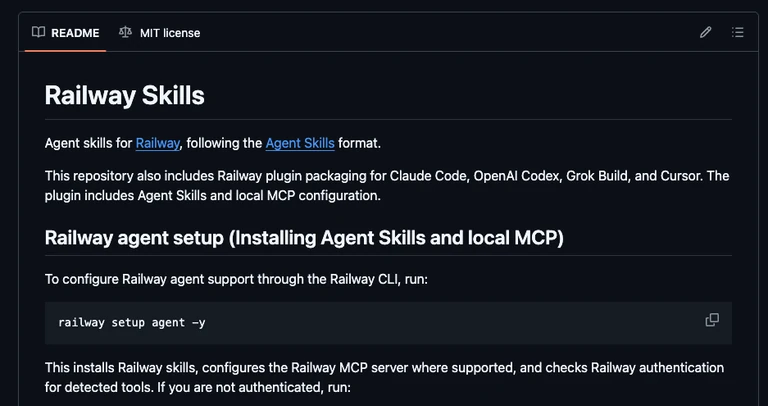
That combination matters. The CLI is the tool surface, but the agent skills are the operating manual. It teaches the agent when to deploy, when to inspect logs, when to use MCP, when to call Railway Agent, and when to ask for confirmation. If the tool surface improves but the instructions do not, the agent still makes bad choices. If the instructions improve but the tools are awkward, the agent gets stuck.
We need both to keep moving together.
Building a better "Up"
With initial configuration of the tooling squared away, we looked at optimizing the next step in the chain - login and initial deployment. When agents reach for Railway, the first thing they typically target is running railway up - to validate if they can deploy the application.
For a new user, we've enhanced railway up to determine if the incoming request is an agent harness, and put you on the fast-path to getting deployed. Sign-in has been optimized to handle sign-up if needed, and from there, drop right into creating the project and deploying the application from your current directory. The outcome we're going for is that you're fully signed up and deploying with that first action.
If you are already signed in, railway up continues down its normal path of getting your app deployed in your project, but includes the project creation and linking steps - making it far more effective one shot.

We use agent skills to teach the agent how to debug issues as they come up, and monitor for the deployment to finish.
MCP - Local and Remote, and when less is more.
MCP is an ever changing surface area, that we're still evolving the story in.
- CLI MCP is the default for local coding-agent workflows.
- Remote MCP is the option for environments where local terminal access is not available or not wanted.
- The older
npxpath is officially deprecated.
CLI MCP is the right answer when local context matters. If the agent is deploying the directory in front of it, using your local auth, or working inside a linked project, it should go through the CLI-backed MCP server. It's also extremely low friction, since the same setup flow can install the CLI, configure MCP, and add Railway's agent skills.

Remote MCP is the right answer when the agent only needs OAuth-scoped Railway operations. It can inspect projects, pull logs, check deployment status, and call into railway-agent without depending on a local install. We have been expanding that tool surface based on what people are actually using, with more project status and log workflows already in, and sandbox and deployment configuration work coming next.
Usage has been moving in the direction you would expect. MCP-driven agent usage keeps climbing, and active user utilization is up more than 5x over the past month.
That does not mean MCP is the whole answer. It means agents clearly want a tool interface to the platform. Our job is to make the routing obvious enough that they choose the right surface without turning every task into a protocol decision.
More than just a computer. Giving agents infrastructure.
Sure, agents are better when they have a computer, but in Railway - we're giving agents access to the entirety of infrastructure. Databases, volumes, functions, services, networking. The works.
If you give an agent a shell, it can edit files and run tests. That is good. If you give it a shell plus the ability to create services, attach Postgres, add Redis, persist data in a volume, create buckets, configure variables, deploy templates, inspect logs, and ship the result, you get a very different kind of loop.
The agent is not just producing code anymore. It is assembling platforms and systems around the code.
Sandboxes are a critical part of this story. Sometimes, work needs to happen somewhere disposable before it gets anywhere near a live service: dependency upgrades, build debugging, reproduction cases, PR review, security checks, code generation, and all the other messy middle steps between "I have an idea" and "this should deploy."

We have been adding sandboxes so agents can get a real execution environment with a filesystem and shell, clone code, run commands, make changes, and hand back something reviewable.

We have also been making the sandbox itself more agent-native. More on that this week (hint for tomorrow); but getting started using agents inside of these sandboxes is about to get much easier.
We pushin gto get past "can an agent run code in a sandbox?" and instead get your agent to think "how can I make this application better when my sandbox is connected to the same infrastructure layer it will eventually deploy onto?"
Railway Agent as an operator
We've talked a lot about using agents WITH Railway; but Railway itself has it's own Agent.
Your coding agent is really good at learning how to build your applications. Likewise, the Railway Agent is really good at knowing Railway.

It knows the project model, the services, the deployments, the logs, the variables, the templates, the networking, and the ways these things usually break. It can help deploy a new service, configure a template, diagnose a failed build, inspect logs, and open a PR when the fix needs to land in code.
We have been exposing that agent wherever the rest of the loop happens: in the dashboard, through the railway agent command, and through Remote MCP. The more places it is available, the less your coding agent has to become a Railway expert from scratch.

Your agent should be able to ask the Railway-native agent whats happening in your project, get a useful answer, and keep the loop building. For more complex work, Railway Agent can deploy its own sandboxes too, giving it room to do real debugging or code-change workflows, instead of only describing what it thinks might be wrong.
Over time, this becomes less like chat bolted onto a dashboard and more like another developer helping you build in your project. One that can help keep the system running, but also help ship the next version of it.
Rails, not handcuffs
The more capable these agents get, the more important boundaries become.
This is the reason Guardrails matter.
If an agent can create infrastructure, deploy services, change configuration, inspect logs, open PRs, and run code in sandboxes, teams need a way to say "yes, go fast, but inside these rules."
One of the first Guardrails policies is deploy source control. Workspace admins can restrict deploys to repositories owned by approved GitHub organizations. Railway verifies the source server-side, stores approved orgs by immutable GitHub IDs, and fails closed when it cannot prove the source is allowed. Existing resources are not shut down, but future deploys and source changes have to follow the policy.
That is not about making agents less useful. It is what lets teams give agents more room.
Nobody wants an agent deploying from a random fork, a personal repo, or an unapproved image because it got a little too confident halfway through a task. The answer is not to keep the agent away from deploys forever. The answer is to make the deploy path safe enough that using it feels reasonable.
Guardrails are the policy layer for controlling that. If everything we've focused on so far is how we complete that first loop; Guardrails are how we make sure that we're doing that loop safely - and is a surface area we're going to keep expanding.
Where we are
The elegance of Railway isn't that it's just a great place to host applications - it's the underlying primitives that we've exposed as building blocks you can piece together in different ways, to build everything from Agent Runners up to full SaaS products.
Onboarding gets the user and agent into Railway without breaking the first deploy. The CLI gives agents a predictable local control plane. Skills teach them how to choose the right path. MCP gives them a tool interface, locally or remotely. Railway Agent gives them a project-aware operator. Sandboxes give them somewhere to do the messy work. Guardrails let teams define the boundaries.
There is still a lot to build. More CLI coverage. More Remote MCP tools. Better sandbox workflows that carry into cleaner deployments. More plugin distribution. More Guardrails policies. More ways for Railway Agent to generate and verify code changes. More paths for agents to loop, without creating confusing experiences for humans. More peace, faster paths from idea to elegance.
Tighter loops. More software running.
Happy shipping.
— Cody
