
Better Rails for Agents: A New Remote MCP and Railway Agent in the CLI
Go check out https://mcp.railway.com to get started; or update your railway cli and fire off a railway agent to check it out!
If you've been watching the MCP and agent space at all over the last year, you've probably felt the same shift a lot of us have — agents have gone from a fun side experiment to the way a real, growing chunk of people actually build and ship software. Whole workflows that used to live in a browser tab or a terminal now happen inside Cursor, Claude Code, Codex, Copilot, and an expanding cast of clients. Which means the platforms people deploy to are going to be judged, more and more, by how cleanly they talk to those agents.
A great agent-first experience is about building your platform so that when agents are reaching into your product — or when you're building agents inside your product — the whole thing flies. We're making it so that when you want an agent to do something on Railway, it can, quickly, through whatever surface fits how you work. Friction free. Think Shinkansen. Maglev.
We've pretty heavily invested in all things skills, MCP, and agents already. Today we're shipping another set of cars on the agent train, in two pieces:
- The Railway Remote MCP Server is live at
mcp.railway.com, ready for testing. Any MCP-compatible agent (Claude, Cursor, Codex, Copilot, Droid, OpenCode, etc.) can connect over OAuth and start managing Railway projects directly from your editor — no local install, no token files on disk. - The Railway CLI has a new
railway agentcommand, so you can talk to Railway's AI agent from your terminal, in your scripts, or in your CI, without installing anything beyond the CLI you already have.
The short version of what we're after: go build, and keep pushing your agent to ship, and we'll keep making the rails for those agents better. You shouldn't need a computer science degree in deployment, networking, and infra plumbing anymore to get your app live. We want to make Railway the easiest and best platform for agents to work with.
Let's walk through each piece.
1. Remote MCP Server at mcp.railway.com
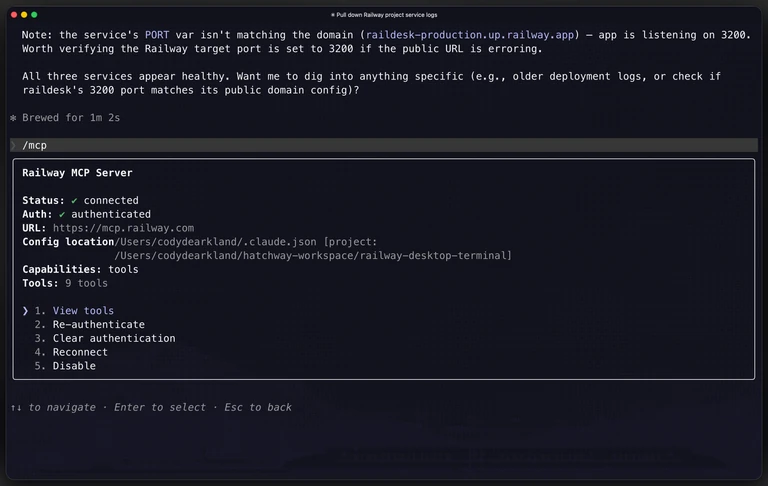
For the editor-and-agent side of the world, the Railway Remote MCP Server is live today at mcp.railway.com in public testing.
The fastest path in is the setup page itself at mcp.railway.com — we built it specifically to get you from zero to connected in a few clicks. It's got a tab for every editor we currently support (Claude, Cursor, Codex, GitHub Copilot, Droid, OpenCode, plus a generic config for anything else), click-to-copy snippets for each, and a one-click install button for Cursor. Pick your editor, hit copy, you're connected.
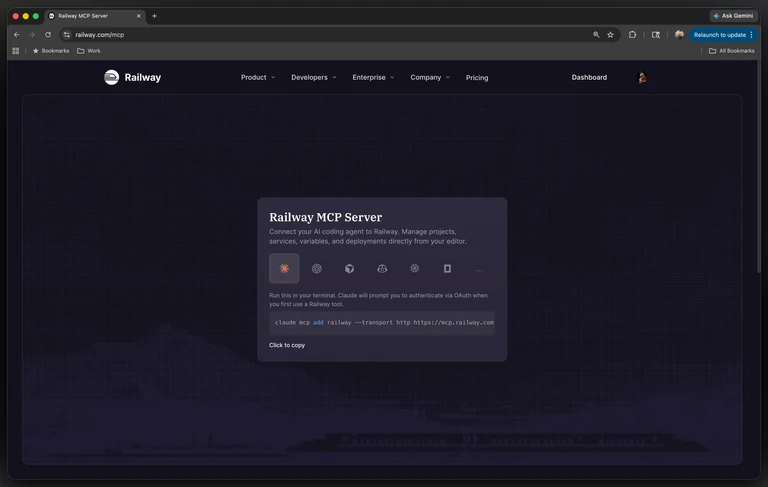
If you'd rather grab the config straight from here:
Claude Code:
claude mcp add railway --transport http https://mcp.railway.comCursor: one-click install from mcp.railway.com, or add to .cursor/mcp.json:
{
  "mcpServers": {
    "railway": {
      "url": "https://mcp.railway.com"
    }
  }
}
Everyone else (Codex, Copilot, Droid, OpenCode, generic) has a click-to-copy snippet at mcp.railway.com.
Prefer a fully local setup? The local MCP server is still maintained alongside the Railway CLI.
OAuth consent opens in-browser on first use. You pick which workspaces and projects the client can access, and you can revoke it from Railway settings at any time. No CLI login, no config spelunking, no tokens on disk.
Once connected, the client can list projects, read and update variables, redeploy services, and — critically — call railway-agent to hand a natural-language task to Railway's agent.
A few things to try
Once your client is wired up, these are the kinds of calls that just work, right out of the box:
Look at what you already have running:
Show me all my Railway projects, and what services are in each oneSpin up something new:
Create a new Railway project called "checkout-service"Pull in the agent for the hard stuff:
Use the Railway agent to figure out why my backend service is crashing on deployThat last one is the shape I’ve been using the most — the natural language approach. Your client passes the question to railway-agent, and Railway's agent does the actual investigation (reading logs, checking config, correlating deploys) and hands back a summary - with all the context it knows how to use. One round-trip from your editor's perspective, with the full multi-step reasoning happening on our side.
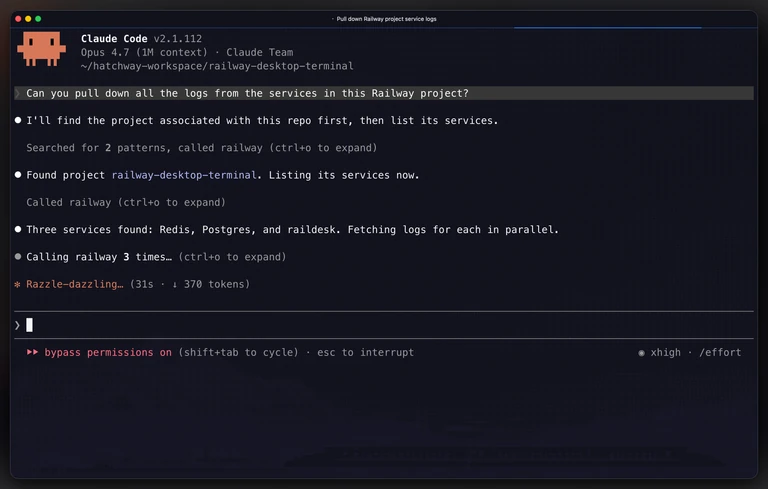
2. railway agent, the new CLI command
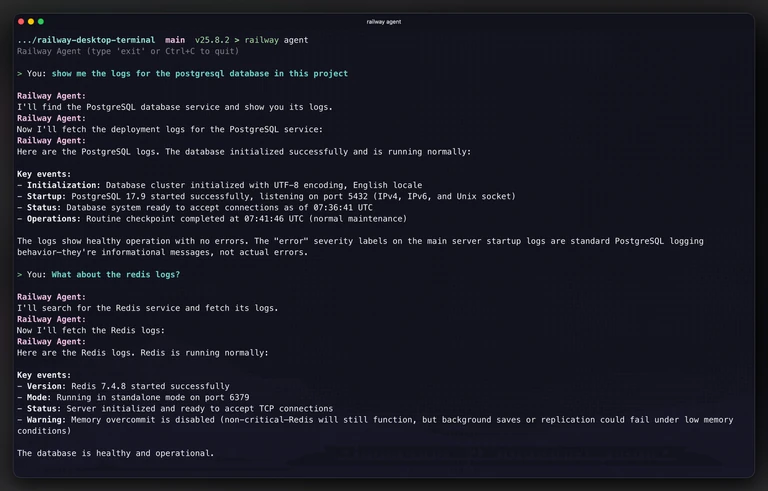
Not everyone wants their agent experience to live inside an editor. Some folks — reasonably! — prefer to stay in their terminal, pipe things around, or script their workflows. Both are valid, and we want our agent approach to meet people where they are, not force a single path.
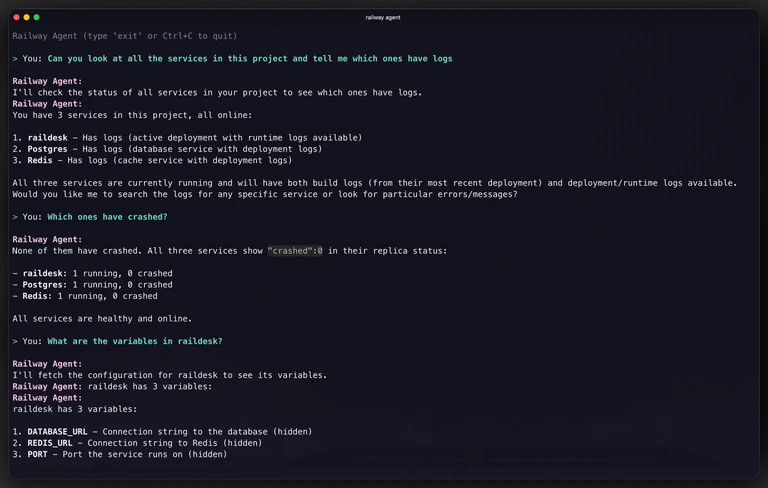
So the Railway CLI now ships with a railway agent command. At its simplest:
railway agent -p "show me the logs for my project"It's talking to the same agent the dashboard uses, with access to the same internal tools. You can:
- Drop into an interactive session with just
railway agent— back-and-forth conversation that remembers context within the session. - Send a one-shot prompt with
-pfor scripts and quick questions. - Get JSON output with
--json, including the thread ID and every tool call the agent made, so you can chain it into automation. - Continue a thread with
--thread-idto pick up where a previous conversation left off. - Scope to a service with
--serviceor to a specific environment with--environment.
A few things it's particularly good at on day one:
# Create a Postgres database and wire it up
railway agent -p "add a Postgres database to this project and set DATABASE_URL on the API service"

# Investigate a failing service
railway agent -p "help me figure out why my backend service is crashing on deploy"

# Check resource usage
railway agent -p "show me memory and CPU for my services"

# Pipe it into whatever
railway agent -p "list my services and their status" --json | jq '.toolCalls'
If you've ever stared at a failing deploy and wished you could just ask, this is that. And it works well in CI — because it's scoped to your user token, it can do anything you can do, nothing more.
Thinking about MCP tool strategy
The design call I'm most interested to see play out is the tool surface itself, because it's the part of the MCP we're still actively refining.
The easy instinct when shipping an MCP is to expose everything. Wrap every API call as a tool, mirror every CLI command, and ship a big tool list. More tools = more capability, right?
We went the other way. The Remote MCP ships with 7 tools today, and honestly - I'm already setting up how we're going to reduce that. When I drafted this blog post it was 9. 2 down!
| Tool | What it does |
|---|---|
whoami | Who's authenticated |
list-projects | All projects you can see |
create-project | New project |
list-services | Services + environments in a project |
redeploy | Ship it again |
accept-deploy | Commit staged changes + deploy (marked destructive; the client prompts for approval) |
railway-agent | Delegate to Railway's AI agent |
Two things drove this shape, it all comes back to context.
Context is expensive on both sides
Every tool definition you expose lives in the client's prompt — every turn, before the user's actual work. A 7-tool surface is cheap. A 25-tool surface is not. And before the model can use a tool, it has to pick one from the list, and larger lists measurably hurt selection quality. That's the client-side cost, and it's paid by the user, out of their context window, on every interaction.
There's a server-side cost too. Each individual tool-call round-trip also burns the user's context when the result comes back. So a multi-step operation — "debug my deploy," "set up Postgres for this service" — is really 6 narrow tool calls under the hood, costing the user 6 trips' worth of context before they get an answer.
railway-agent is the shape that fixes this on both sides. The client sends one natural-language message. Railway's agent does the full multi-step investigation internally — reading logs, checking config, correlating deploys, whatever it needs — and returns one consolidated response. The orchestration complexity stays on our side, where we can keep improving it. The user's context stays cheap.
Where we want this to go
Our medium-term direction is straightforward: keep the direct MCP tools minimal, push more and more of the rich, multi-step behavior into railway-agent, which hands off to Railway's AI agent — the custom-built harness that already knows the best ways to bend the rails to its will. Huge credit to the Railway Agent team for building that harness, and for shaping it in a way that made wrapping it in an MCP tool trivial.
The direct tools that stay are the ones that are cleanly bounded and don't need reasoning — list-projects, create-project, redeploy. Clean CRUD and discovery. Everything that's really a question in disguise — "what's wrong with my service," "how should I set up a database for this," "why did my last deploy fail" — should route through railway-agent, and our agent manages the sequencing.
Two wins if we get this right:
- The user's context stays cheap. Their editor isn't paying for sprawling tool definitions they rarely touch, and multi-step operations cost one round-trip instead of six.
- Orchestration improves in one place. We can sharpen Railway's agent over time and every MCP client (and every CLI user) gets the benefit automatically — no tool-surface breaking changes, no schema churn, no "please update your MCP config."
A nice side effect: because railway-agent tracks which sub-tools it calls under the hood, we get real usage data about which capabilities might eventually earn promotion back up to a top-level MCP tool. We're not guessing at the tool surface — we can let actual usage inform it.
A quick tour inside the engine
For the folks who like knowing how the train uses the steam, a couple of implementation notes worth sharing. (If you're here because you want to build and ship your own MCP server, we have a guide for that too.)
Both surfaces talk to the same backend. Under the hood, shipping these meant exposing Railway's agent as a small REST endpoint (POST /api/v1/agent) so anything that can make an HTTP request can reach it. This is more plumbing than anything, but it made the Remote MCP and the CLI using the agent directly possible. Since we’re taking this centralized approach, every improvement we make to the agent within Railway lands in both surfaces.
The MCP server doesn't live as a separate service. It's a route handler inside Railway's main backend. First pass of the architecture went the other way: separate service, separate Postgres, separate Redis, independent deploy. What pushed us in the other direction was that we kept staring at rebuilding many of the main app's pieces — user sessions, OAuth grants, workspace/project permissions, dataloaders, encryption, analytics. What we were building was starting to look like an elaborate proxy back into the monolith.
Here's what the route handler actually looks like inside backboard. sessionMiddleware — the same middleware that authenticates every other backboard request — has already resolved the Bearer token into ctx.user by the time this runs, so the handler's job is small: pack up a RailwayContext, stand up a fresh MCP SDK server + transport for the request, and hand the raw req/res off to the SDK.
// packages/backboard/src/handlers/http/routes/mcp/index.ts
async function handleMcpRequest(ctx: RailwayKoaContext) {
  if (!ctx.user) {
    setWwwAuthenticate(ctx);
    ctx.status = 401;
    ctx.body = { error: "Authentication required" };
    return;
  }

  const railwayCtx: RailwayContext = {
    user: ctx.user,
    db: ctx.db,
    encryption: ctx.encryption,
    dataloaders: ctx.dataloaders,
    oauth: ctx.oauth,
    // ...
  };

  const server = createMcpServer();
  const transport = new StreamableHTTPServerTransport({
    sessionIdGenerator: undefined, // stateless
  });

  ctx.respond = false; // let the MCP SDK write directly to ctx.res

  await server.connect(transport);
  await mcpContextStore.run(railwayCtx, () =>
    transport.handleRequest(ctx.req, ctx.res, ctx.request.body),
  );
}
That's the whole thing. No separate service. No parallel auth system. A Koa route that happens to speak JSON-RPC — it even shares a file with a sibling handler that redirects browser GETs over to railway.com/mcp, because the same URL does both jobs depending on the Accept header.
Folding it in meant:
- OAuth piggy-backs on the existing OIDC provider. No second auth system, no duplicated consent UI, same grants infrastructure. Huge credit to the platform folks who built this in a way that made it easy to light up a new surface on top of.
- Tools call controllers directly. No extra GraphQL hop, no token forwarding, no mirroring permission logic in two places.
RailwayContextflows throughAsyncLocalStorageinto tool handlers per-request, so auth, permissions, and data access just work — without hand-threading context through every call.
If you want to peek at what some of this looks like in code, a few moments from the implementation that I think are particularly neat.
The per-request context store. Tool handlers never have to thread context through their arguments — they just reach into the store and grab it:
// packages/backboard/src/handlers/http/routes/mcp/context.ts
export const mcpContextStore = new AsyncLocalStorage<RailwayContext>();

export function getMcpContext(): RailwayContext {
  const ctx = mcpContextStore.getStore();
  if (!ctx) throw new Error("MCP tool called outside request context");
  return ctx;
}
At the route handler, each MCP request runs inside the store before being handed off to the MCP SDK's transport:
await mcpContextStore.run(railwayCtx, () =>
  transport.handleRequest(ctx.req, ctx.res, ctx.request.body),
);
The tool factory. Because auth, OAuth project access, and error handling are lifted out of individual tools, the tools themselves stay on the rails for the thing they actually do. The entire redeploy tool:
createMcpTool(server, {
  name: "redeploy",
  description: "Trigger a redeployment of a service in a given environment",
  annotations: { destructiveHint: true },
  schema: {
    projectId: z.string(),
    serviceId: z.string(),
    environmentId: z.string(),
  },
  handler: async (ctx, params) => {
    const latest = await getLatestDeploymentForEnvironment(ctx, {
      environmentId: params.environmentId,
      serviceId: params.serviceId,
    });
    if (!latest) {
      throw new McpToolError("No existing deployment found. Deploy first.");
    }
    const deployment = await redeployDeployment(ctx, {
      deploymentId: latest.id,
    });
    return `Redeployment triggered! New deployment: ${deployment.id}`;
  },
});
No auth check inside the handler. No permission check. No try/catch boilerplate. And because ctx is the full RailwayContext, redeployDeployment(ctx, ...) is the same controller the dashboard and the GraphQL API call — exactly one source of truth for "redeploy a service."
The OAuth discovery mirror. The .well-known/oauth-authorization-server endpoint on mcp.railway.com doesn't spin up a second auth system — it's a pointer back to backboard's existing OIDC provider, with the RFC 8707 resource parameter pre-baked into the advertised authorize URL so audience binding happens even if a client forgets to add it:
wellKnownRouter.get("/oauth-authorization-server", (ctx) => {
  const backboard = RAILWAY_BACKBOARD_ORIGINS[RAILWAY_ENV][0];
  const resource = `${ctx.protocol}://${ctx.host}`;

  const authorizeUrl = new URL("/oauth/auth", backboard);
  authorizeUrl.searchParams.set("resource", resource);

  ctx.body = {
    issuer: backboard,
    authorization_endpoint: authorizeUrl.href,
    token_endpoint: `${backboard}/oauth/token`,
    registration_endpoint: `${backboard}/oauth/register`,
    // ...
  };
});
Every advertised endpoint points back to backboard. No parallel OAuth state, no duplicated consent UI — just a discovery document that hands the MCP client back to the authorization server.
For our use case; folding it into the existing product and keeping it as part of the overall platform directly ended up having a lot of efficiency and simplicity benefits. Sure, it's less greenfield-fun, but the amount of plumbing you don't have to rebuild is significant — and it means your MCP benefits from every auth and observability improvement the rest of the app ships.
One auth system. One permission model. One place to improve the agent. Two on-ramps that meet people where they already work.
What we want to learn from you
The way people are using agents with these tools seems to be changing every few days still. We want the feedback from you on how you want to use it, and where the sharp edges are. The tool surface, the CLI flags, the response shapes, the destructive-action prompts, the balance between direct tools and railway-agent delegation — all of it gets clearer once real people are using it on real projects.
If you pick this up and something's off, or you have an idea for what the better version of this looks like, the Central Station feedback board is where that conversation lives. We read it. Every signal you send is how we learn what to build next, which tools to add, which ones to retire, and how the agent itself should grow.
The goal we keep coming back to is a simple one: better rails that agents can glide on, so the people building on Railway can spend their time building instead of navigating plumbing.
Start here
- mcp.railway.com — click-to-copy config for every editor, OAuth from your browser. (Remote MCP docs)
railway agent— update the CLI and try it from your terminal or a script.
Both are live in testing today. Go build something cool!
Happy shipping.
- Cody