
Your Cloud should come with an app builder
Twenty minutes is apparently enough time for an agent to build and deploy an online multiplayer first-person shooter. Don't take our word for it. You can play it right now. Bring a friend, there's respawning.
Real-time multiplayer first-person shooterHere's the entire prompt:
Build a realtime multiplayer first person shooter game. Players can automatically quick-join a room, join an existing room using a code, or create a new room and receive a code to share with others. Players can shoot each other and deal damage. once you die you respawn again. Generate all assets. Map, sounds and visual graphics. Ensure that the realtime aspect works locally and in production
The agent went off, built it, tested it by playing a round against itself, and shipped it. The game is fun for a couple of minutes. Making it something you would come back to would require a lot more work. That said, it's pretty impressive what agents can do today off a couple of instructions.
Better yet?
The whole thing happened on dev.new, which is the thing we actually want to show you.
dev.new?
Until recently, if you wanted to deploy something to Railway, you needed a source. It could be local code via railway up, a GitHub repo, or a Docker image. From there, we'd build your app and deploy it.
If you didn't have a source though, there wasn't much you could do. Fortunately, agents made that a lot less of a problem. You just tell an agent what you want to build and it will give you code. From there, the agent can even deploy it to Railway and keep iterating until it works.
We've been building for exactly that workflow: an agent-first CLI, MCP servers, and skills, so Railway is easy to drive from an agent. We've written plenty about it.
But in that workflow, the building still happens somewhere else. The code only arrives here at the end. So we asked the next question: what if you could build and deploy in the same place? Show up with just an idea, leave with a running app?
Back into the lab we went. The result is dev.new.
dev.newYou log in with your Railway account, describe what you want to create, and your app gets built for you. You can preview your app, iterate on it, and once you're happy with the result, deploy it. Deploying gives your app its own service in the same Railway project, with a public URL you can share.
On dev.new, your app runs on a real computer on Railway from the first prompt: persistent disk, real domain, and a server that can hold state.
That's why we picked a real-time multiplayer game as the demo. It's the kind of app you can't build client-side. Something has to hold the state of the match: where each player is, how much health they have, which room they're in. Something has to accept a WebSocket per player, decide who shot whom, and keep the room alive as players come and go. All of this requires a long-running server.
Here's what that computer looks like, and what the agent did with it.
The machine, the agent, the run
The machine
Your first prompt creates a Railway project in your workspace, named after what you're building. Inside it boots the computer the agent lives on: a full VM. It uses the same infrastructure that powers Railway Sandboxes. Here's how the pieces connect:
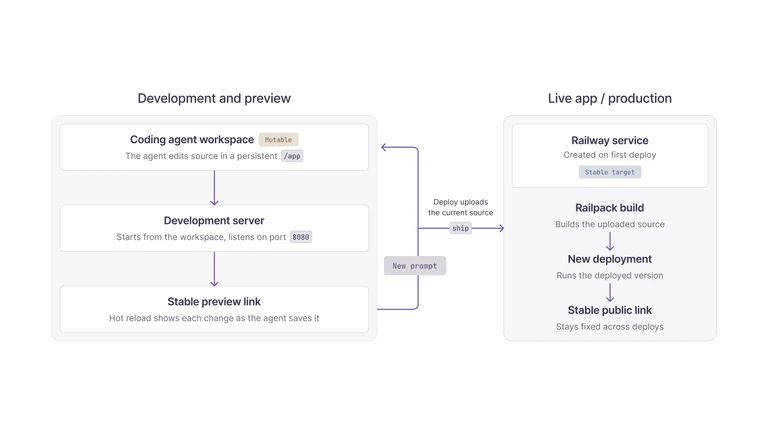
The workspace is /app. First boot copies in a baked template with Vite, React 19, Tailwind CSS v4, and TypeScript. The dependencies are preinstalled, so the preview can start without waiting for a cold install.
Everything in /app persists, including the agent's session transcript. After the machine has been idle for a while, it flushes the filesystem and shuts down. When you come back, it reattaches the same volume and starts again, with the code and conversation where you left them. The template also carries the workspace rules. The dev server is already running on port 8080 with hot reload, so the agent must never start, stop, or restart it. vite.config.ts, the file that wires the live preview, is off limits. Adding dependencies is fine.
That vite :8080 line is also your window into the machine: the studio renders it as the live preview while the agent works. Click an element in the preview and dev.new resolves it to the component, file, and line that produced it. The element is then handed to the agent with your next prompt. This is a much better experience than writing a paragraph about "the third card from the left".
The agent
The coding agent inside is the Railway Agent, railway-agent, our own coding agent. It runs inside the VM rather than reaching into it from outside, and it works in /app like any developer would: editing files, running commands, reading logs.
Beyond the shell, it gets the pre-authenticated Railway CLI, Playwright with Chromium baked into the image, and ship, a tool that deploys the working directory. Attached context integrations are available through MCP. This run leaned on the shell, Playwright, and ship.
The run
The agent started by looking around: what's in the workspace, what the project looks like, what's already running. Then it installed the handful of libraries it needed and got to work.
What came out is a single deployable app: a server that owns the match (which rooms exist, who's in them, everyone's position and health, who shot whom), serving a client that renders the game and sends your inputs back. Every asset was generated along the way. The map, the textures, and each sound effect are code.
The agent checked its work in a real browser in the VM, read the console, and caught bugs that a type checker would miss.
It also played the game to test it! It spawned two browser sessions in the same room and watched the players move, shoot, die, and respawn. For the game rules, it wrote a small script that connected two players and had one repeatedly shoot the other, confirming damage, death, and respawn came back in the right order.
Once everything passed locally, it deployed with ship and ran the whole playtest again against the live URL.
ship is a small wrapper around Railway’s normal deployment flow. The first time it runs, it creates a service in the same project and remembers it for future deploys. It uploads /app, then Railpack detects the app, installs its dependencies, runs the production build, and figures out how to start it. Once the build succeeds, Railway assigns a public domain and ship returns the live URL. The next deploy updates the same service.
Where this goes
Because a dev.new app is a regular Railway project, the dashboard already knows what to do with it: add a database, set variables, attach a custom domain, or operate the deployed service directly. Build a one-off internal tool this afternoon, grow it into a production system later. Nothing to export or re-platform when the prototype turns serious.
Over time we want this loop inside the Railway dashboard itself, so your agent, source, infrastructure, previews, and deployments stop being separate places. Until then, bring an idea to dev.new and we'll take it from there.
We’re testing with users now. Build something, then tell us where the agent or interface got in your way. Leave feedback in this Central Station thread or on Discord.
